The step sequencer (Grid mode)
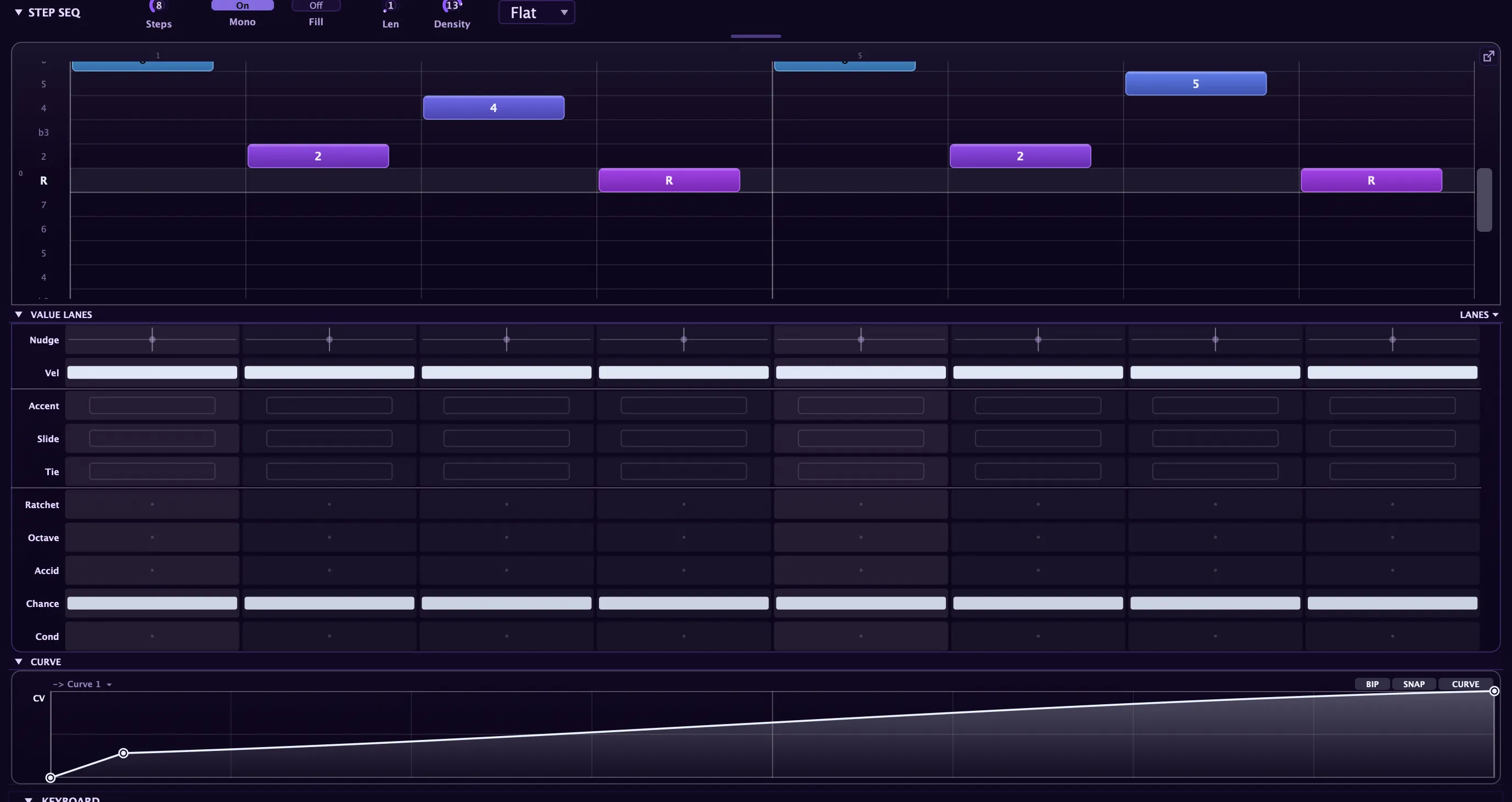
Grid is the step-sequencer mode of the note editor: a degree-relative, in-key note grid. Each step carries its own fields (octave, accent, velocity, slide, tie, ratchet, nudge, chance, and conditional triggers) alongside the per-note value lanes. It plays notes and, like the arp, doubles as a modulation source.
Set the Seq mode to Grid and the panel grows to show the step editor. Grid mode is a mode of the arpeggiator, so it inherits the arp’s clock, rate, gate, Latch, the scale foundation (Root, Scale, Snap, and diatonic Transpose), and the rhythm layer (Swing, Probability, Euclidean fill). See the arpeggiator for that shared machinery, and the note editor for the transport, tabs, and Roll looks that Grid shares with the piano roll. To have a chord progression re-harmonize your drawn pattern as it cycles, add a chord lane above the grid.
How the pitch grid works
Section titled “How the pitch grid works”The step sequencer is not a piano roll; it is a degree grid. Each cell in a step column represents a scale degree relative to the note you hold. Degree 1 is the root, degree 2 is a step up the scale, and so on. Because the pitch is always relative, the whole pattern transposes and stays in key the moment you change the held root. You literally cannot play a wrong note.
Each step plays a single note or a chord: light one degree cell for a mono line, stack several for a sequenced chord. Extra held notes are ignored; the lowest held note is the root.
Per-step fields
Section titled “Per-step fields”Each step carries a full set of controls:
| Field | What it does |
|---|---|
| Degrees | The scale degree(s) this step plays: one note or a stacked chord |
| Octave | Register shift (−2 to +2): reach below the root without a taller grid |
| Accidental | A one-semitone nudge: the one chromatic escape from the scale, for approach notes |
| Accent | Lifts the velocity toward full for the emphasized hits |
| Velocity | The step’s base loudness before accent |
| Slide | Glides into the next step: the 303 legato portamento |
| Tie | Holds the previous note through this step as one continuous note |
| Ratchet | Retriggers the step 1–8 times across its slot (rolls and stutters) |
| Nudge | Per-step micro-timing: shift this step’s onset early or late |
| Chance | Per-step play probability, multiplying the global Probability |
| Cond | A conditional trigger: the step only fires when its condition is met |
A rest advances the clock but plays nothing. Steps sets how many cells play (see clip length).
Patterns travel with presets, so a bassline you save comes back with the sound.
Slide and tie: the 303 legato feel
Section titled “Slide and tie: the 303 legato feel”Slide and tie each give the line a different kind of continuity.
A slide step glides into the next note instead of retriggering, the classic 303 portamento bend. For the glide to actually bend the pitch, turn Glide up in the voicing controls. Keep Mono on (its default) so slides collapse to a single legato voice.
A tie holds the previous note through the step with no re-attack, turning a run of tied steps into one sustained note.
For an acid bassline: set Mono on, set Glide, dot a few slide cells, add octave pops and an accidental for approach notes. The filter does the rest.
Ratchet roll dynamics
Section titled “Ratchet roll dynamics”A ratcheted step fires its note evenly across the slot for rolls and stutters. Each hit follows a Shape you choose:
- Flat: every hit the same level.
- Up: crescendo to full.
- Down: descrescendo from full.
- Up-Down: swells to a peak and back.
- Random: a stable per-loop shuffle that repeats identically each pass.
The roll’s mini-blocks in the grid visually match the shape, so what you see matches what plays.
Chance vs Conditional — the two per-step gates
Section titled “Chance vs Conditional — the two per-step gates”Chance and Conditional are both “does this step fire?” gates, and they’re easy to confuse. The distinction that matters: Chance is random, Conditional is deterministic.
| Chance | Conditional | |
|---|---|---|
| Behaviour | Rolls a die every cycle — fires about N% of the time | Repeats identically — a fixed rule on the pattern pass |
| Value | 0–100% probability | A trig condition (1:2, 2:2, 1:3 … 1:8, FILL/!FIL, PRE/!PRE, 1ST/!1ST) |
| Repeatable? | No — different every loop | Yes — the same every loop |
| Scope | Per note (each chord tone rolls its own) | Per step (gates the whole step) |
| Reach for it when | Humanising, thinning, “sometimes” hits | Fills, every-other-bar variation, ghost chains |
| Editing | Drag lane (plus Play All / Play One groups) | Click-to-menu cell |
They combine (AND): a step fires only if it passes both its Chance roll and its Conditional (and the Euclidean fill, and the global Probability). So 1:2 + 60% Chance = every other pass, and then 60% of those. The classic pairing is Chance on one step plus PRE on the next, for dependent ghost notes (described below).
Conditional triggers
Section titled “Conditional triggers”Each step can carry a Cond value that gates it behind a rule. A step has to pass its Cond check, its own Chance roll, and the global Euclidean fill mask to fire. The condition families are:
- Loop ratios: the step plays on a chosen loop out of every few passes. An X:Y ratio reads as the Xth loop of every Y, so 1:2 plays on odd loops, 2:2 on even loops, and 1:4 only every fourth time through. The full set runs through all :2, :3, and :4 combinations, plus sparse long-cycle ratios: 1:6 surfaces the step once every six loops and 1:8 once every eight, useful for a fill note that appears only rarely, or a slow evolution that takes eight bars to complete. Different steps on different ratios cause the pattern to rewrite itself over several bars.
- FILL / !FILL: the step fires only while the momentary Fill control is held (FILL), or only while it is not (!FILL). Dot extra hits with FILL and they wait until you hold Fill; mark the main groove !FILL and it drops out the instant you call the fill for breakdowns.
- PRE / !PRE: fires only if the previous conditional step did (PRE), or only if it did not (!PRE). With PRE, each pass yields one of three outcomes: neither step, the main step alone, or both together, but never the second step without the first. This creates dependent probability: a ghost note that only shadows its parent, so the pair reads as one musical gesture that either happens or does not. !PRE inverts that relationship: the second step becomes a call-and-response that only fills in when the first drops out.
- 1ST / !1ST: fires on the first pass only (1ST), or on every pass but the first (!1ST). Use it for a pickup that never repeats, or an answer that only arrives after the pattern loops.
Stacked with Chance and Euclidean fill, conditional triggers turn a static grid into an evolving, generative pattern that keeps surprising you.
Euclidean fill
Section titled “Euclidean fill”Euclidean fill lays a rhythmic mask over the whole pattern without changing any pitches. Set a cycle Length and a Density (number of hits to place inside that cycle) and the engine spaces those hits as evenly as possible: 3 hits in 8 gives the tresillo, 5 in 8 the cinquillo. Setting the cycle length differently from the pattern length creates polymeter, so the rhythm accent rolls through the bar.
Per-note focus: editing a voice in a chord
Section titled “Per-note focus: editing a voice in a chord”A step can hold a chord, so the three expressive lanes (Velocity, Accent, and Chance) edit one voice at a time rather than the whole step. Click any note block to focus that voice for editing. When a voice is focused, its whole row washes with a highlight band, its blocks gain an accent ring, and its row label turns bold, so you can see exactly which degree you are editing. A small “editing: <degree>” indicator on the value-lane strip names the focused voice as an interval relative to the root.
With a voice focused, the Velocity, Accent, and Chance lanes read and write that voice across the whole pattern. Steps that hold the focused degree show its values; steps that do not read blank and ignore edits. This lets you set a louder top note across every chord, accent one inner voice without touching the others, or give a single voice a lower play chance for generative variation.
The other lanes (Nudge, Slide, Tie, Ratchet, and Cond) always edit the whole step. Focus is a live editing state and is not saved with the pattern. When no voice is focused, the per-note lanes default to each step’s primary (lowest) voice, which for a mono line is always the only note, so focus only matters once steps hold chords.
The scale editor
Section titled “The scale editor”The Keys scale row includes a per-degree toggle for each scale degree. Click a degree to turn it off; the scale switches to Custom and that degree’s row disappears from the grid, removing those pitches from the pattern’s vocabulary. Use it to sculpt a scale that only contains the degrees you want, from a pentatonic subset right down to a two-note drone grid. Turning a degree back on restores its row with the remaining degrees still set.
Grid as a modulator
Section titled “Grid as a modulator”Because Grid is a mode of the arp, it exposes the same live data as modulation sources you can route through the modulation matrix: the pattern position (a staircase that advances with the clock), the current step’s velocity, and a gate that goes high while a note sounds. Route the step position to filter cutoff for a rhythmic sweep that tracks the pattern.
For pattern-synced modulation you draw yourself, use the Envelopes tab: pick any destination and draw a curve that plays in sync with the pattern.