The chord lane
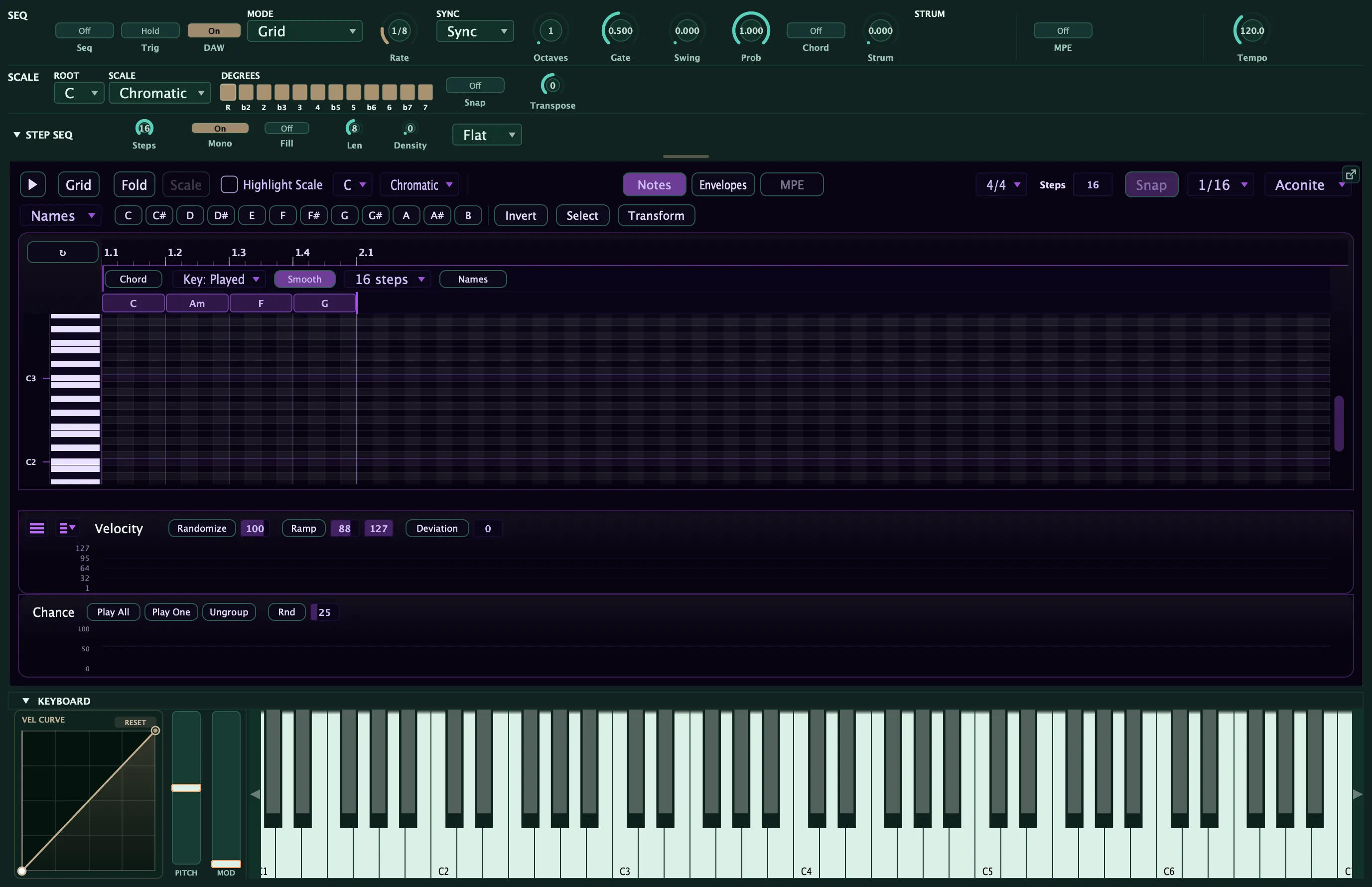
The chord lane lets you play a whole chord progression under the arp from a single held key. Instead of holding a four-note chord and letting the arp walk it, you draw a row of chord blocks (a I–vi–IV–V, say) and hold one note: the lane supplies the chords, and the arp plays through each one in turn as the progression cycles. Hold a different note and the whole progression transposes and stays in key. It shares the arpeggiator clock and rhythm engine, so everything you already know about rate, gate, swing, and probability still applies.
The lane is relative-diatonic: you write the progression in scale degrees, not fixed pitches, so it follows both the key you set and the note you play. It is also polymetric: give the lane its own loop length and it re-colours your pattern as the two cycles drift against each other. One held key becomes an evolving, composed performance.
Turning it on
Section titled “Turning it on”The chord lane starts off, so existing patches sound exactly as before. Two things control it:
- The Chord toggle switches the harmony on and off. When it is off, the arp plays from the keys you hold, as usual. Turning it off mutes the lane without deleting your chords: they stay drawn, ready to switch back on.
- The sequencer mode decides where you see the lane. In Grid mode the chord blocks appear as a band pinned directly above the note grid (shown above), co-scrolling with it. In the pool-walking order modes (Up, Down, Up-Down, Random, As Played), where there is no note grid to align to, the lane appears as a compact docked strip instead.
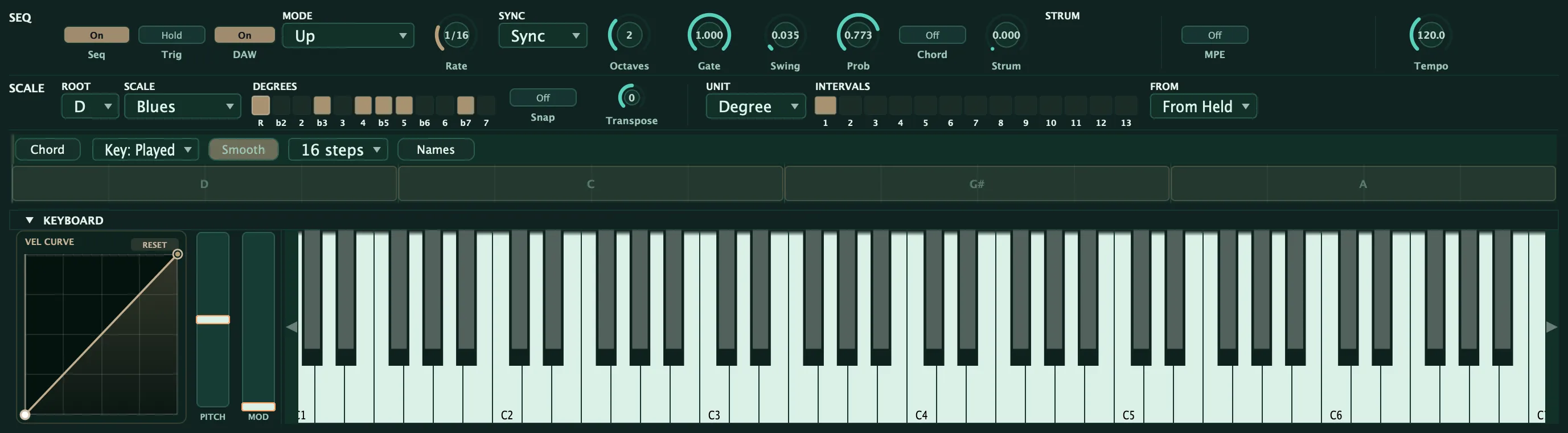
Both presentations edit the same progression with the same controls: only the layout differs.
How the chords play
Section titled “How the chords play”What the lane does depends on the arp mode:
- In the order modes (Up, Down, Up-Down, Random, As Played) the arp walks the current chord’s tones instead of the notes you hold. As the progression advances, the pool of notes the arp is cycling swaps to the next chord. In a mono voice this gives you an arpeggiated line that follows the changes; in a poly voice the chord tones can ring together.
- In Grid mode the chord lane turns your drawn step pattern into a
chord-arpeggiator: each step’s degree indexes the current chord’s tones by
function (degree 1 = the root, 2 = the 3rd, 3 = the 5th, 4 = the 7th, and so on), so
the pattern arpeggiates each chord for real — quality comes through. The same drawn
1-2-3 plays a minor third over a minor chord and a major third over a major chord.
Degree 1 is always the root, so a note you drew on the root stays put no matter the
scale — the chord’s voicing (inversion, drop-2, open, slash bass) shapes how the
chord sounds in the Chord/Sustained output modes, but it never changes which tone a
Grid degree plays. Your rhythm and contour stay put; harmony follows the changes, and
the two run on their own cycles so the pattern keeps evolving.
- Reach (in the chord header) sets what a step drawn above the chord’s own notes does. Extended (default) keeps stacking thirds into tensions — the 7th, 9th, 11th, 13th — so drawing higher builds genuine extended voicings; it’s a real extended-harmony writing tool. Octaves repeats the chord tones an octave up instead, for a strict arpeggiator (basslines, classic arp runs).
- Reading the rows: with the chord lane on, switch the roll’s left-edge labels to Intervals and each row is named by its function in the current chord — R, 3, 5, 7 for the chord tones (shown brighter) and 9, 11, 13 (with ♭/♯ variants) for the tensions above them. So you can see at a glance that a row is “the 9th” while you draw. The labels follow the chord under the playhead as the progression moves.
- (Want free scale/passing tones instead? Turn the chord lane off — the step grid goes back to plain scale degrees. Want fixed pitches? Use Free mode.)
Either way, the scale keeps everything in key: chord tones are the strong notes, and any passing or extension notes stay legal.
Output: walk, stab, or hold
Section titled “Output: walk, stab, or hold”The Output selector in the chord header decides how the current chord actually voices, so one row of chords can be a walked line, a rhythmic stab, or a held pad without redrawing anything:
- Arp (default) — the progression re-colours the notes the arp walks, exactly as above. Use it for evolving arpeggiated lines that follow the changes.
- Chord — the whole voiced chord is stabbed on every step, so the progression plays as rhythmic block chords in time with the arp. Use it for stabbed comps, chord-stab basslines, and rhythmic pads.
- Sustained — each chord is held as a pad and only re-voices when the progression moves to the next block. Notes shared between two chords ring straight through the change, so it sounds like a real player holding common tones. Use it for smooth held pads and connected comping.
Chord and Sustained switch you to a polyphonic voice automatically so the stack can ring (a small P appears on the selector as a reminder). Leave the synth where it is; the lane handles it.
Chord Rate: how fast the chords change
Section titled “Chord Rate: how fast the chords change”By default the progression advances one step at a time with the arp. Chord Rate lets the chords change slower than the arp plays notes: set it to 2, 3, 4, 6, 8, or 16 Steps and each chord holds for that many arp steps before moving on.
Editing chords
Section titled “Editing chords”The chord blocks behave like notes. Drag a block’s body to move it, drag its right edge to resize it, and click empty space to add a new one. Blocks never overlap: drawing over a neighbour trims it, so only one chord is active at a time. A gap between blocks is silence (no chord covers that time, so nothing sounds).
Click a block to open its picker, where you build the chord:
- Degree sets the chord’s root as a scale degree (I through vii), so it stays relative to the key.
- Quality picks the chord type. Left on Auto it derives the correct diatonic triad for that degree in the current scale (so no theory is required), or you can choose an explicit quality (major, minor, seventh, major seventh, minor seventh, sus2, sus4, diminished, add9, sixth) for a specific colour.
- Accidental (flat / natural / sharp) shifts the chord’s root a semitone for borrowed chords.
- Octave moves the whole chord up or down a register.
Below the identity controls is the voicing section, which rearranges the chord’s own tones after they resolve, so a voiced chord still transposes with the key:
- Inversion (root, first, second, third) and spread (close, drop-2, drop-3, open) reshape the stack.
- Slash bass places any chord tone in the bass, so you can write a
C/EorC/Gthat the label reflects automatically. - A per-tone strip lets you nudge an individual voice up or down an octave, omit a tone (drop the fifth, say), or double one (double the root).
- A mini-keyboard preview lights up the exact notes the current voicing produces, so you can see the chord before you hear it.
The lane controls
Section titled “The lane controls”The lane-level controls sit in the chord band’s header (in both presentations):
- Output chooses Arp, Chord, or Sustained — walk the chord’s tones, stab the whole chord, or hold it as a pad (see Output above).
- Chord Rate sets how many arp steps a chord holds before the progression advances (see Chord Rate above).
- Key source decides the key centre. Played follows the lowest note you hold, so the whole progression transposes as you play (the performance trick). Fixed pins the progression to a set key for fixed-song work.
- Voice-Lead: Smooth picks each chord’s inversion to minimise the pitch movement from the previous chord, turning a run of root-position chords into a connected, composed progression. This is the single biggest polish lever; leave it off for strict root-position voicings.
- Loop length sets how many steps the lane runs before it repeats. Set it different from the arp’s pattern length and the two cycles drift, producing polymeter: the same pattern re-colours over several bars before it lines up again. Repeated tiles of the lane are dimmed so you can read its loop against the grid.
- Names / Roman switches the block labels between the sounding chord name (
C,Am,B♭,C/G), which updates live as you transpose, and Roman-degree labels (I,vi,♭VII).
Chord-tone velocity
Section titled “Chord-tone velocity”Velocity depends on context, because the chord lane and the step grid never play the same notes:
- In the order modes and the Chord / Sustained outputs, the chord lane plays the notes, so each block carries its own velocity. Right-drag a block up and down in the docked chord strip: the top of the band is loudest, the bottom is quietest, and the block’s fill height shows it. Double right-click a block to clear it back to auto.
- In Grid mode the chords only re-pitch your drawn step pattern, so the step velocity lane owns velocity there — your programmed dynamics carry straight through the re-harmonisation, and there’s no separate chord-velocity control to fight with.
A block left on auto falls back to the Chord Velocity setting:
- Held-key uses the velocity of the note you play, so your dynamics carry through the transposer: play softer and the whole progression plays softer.
- Fixed plays every chord tone at one set level, for an even, mechanical feel.
In Grid mode the re-harmonized pattern uses each step’s own velocity from the step lane, so the accents and dynamics you drew into the pattern are preserved as it follows the chords.