The note editor (Seq)
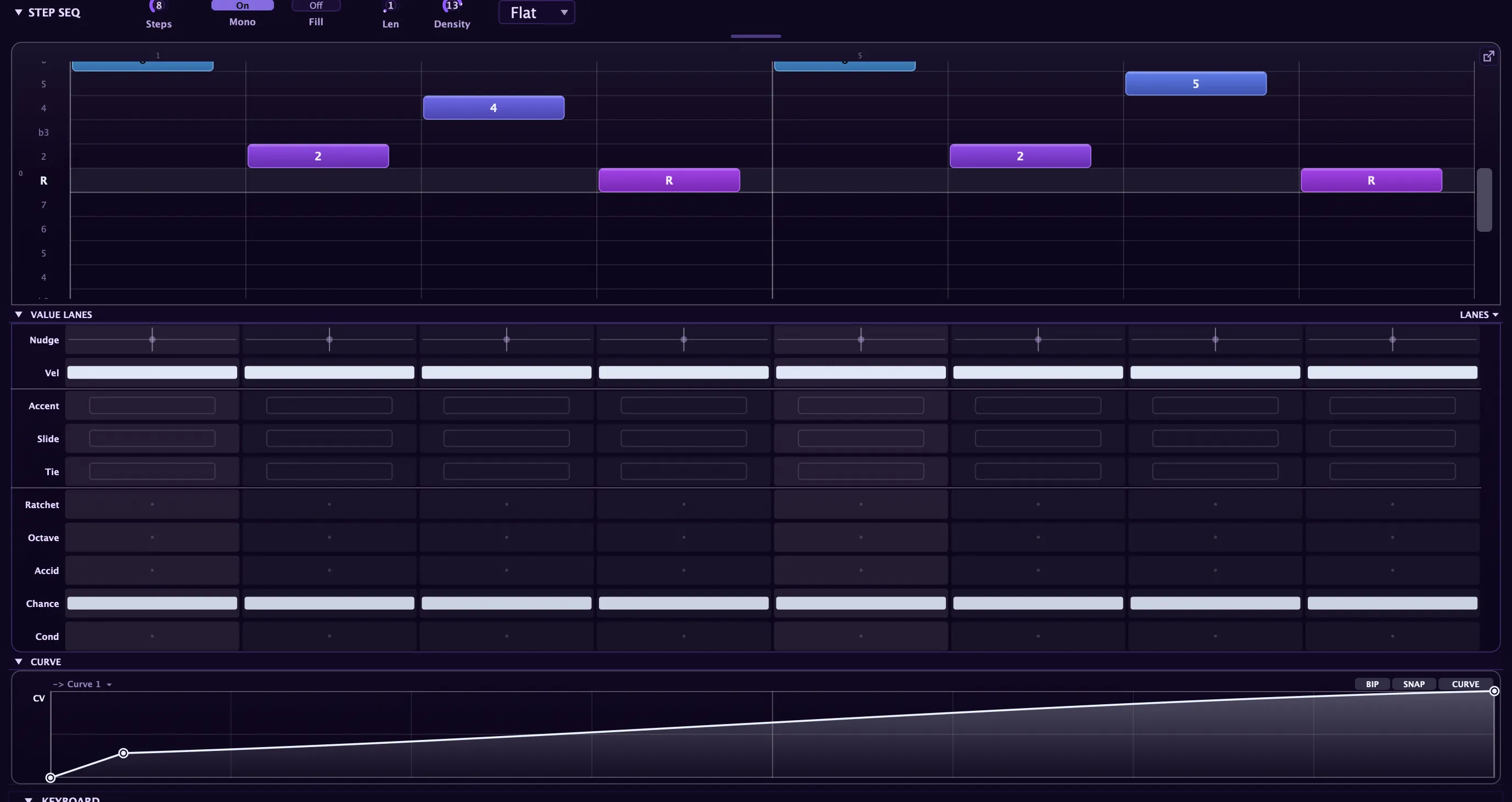
The Seq section is where you author a note pattern. One editor covers two very different jobs through a single Grid / Free mode toggle: Grid is a scale-locked step sequencer, and Free is a free-timeline piano roll. Both share the same shell, the same tabs, the same expression lanes, and the same transport, so you learn the surface once and switch modes without relearning anything.
This page is the overview: the mode toggle, the tabs, the transport, and the controls the two modes share. For the details of each mode see the step sequencer (Grid mode) and the piano roll (Free mode). Every toolbar control, mouse gesture, and keyboard shortcut is catalogued on the editor controls & shortcuts page.
Grid vs Free: one editor, two engines
Section titled “Grid vs Free: one editor, two engines”The mode toggle sits at the top-left of the editor. It does more than change the look: each mode drives its own note engine.
| Mode | What it is | What it targets |
|---|---|---|
| Grid | A scale-locked step sequencer. Snap is forced on, columns shade as step cells, and the Grid-only expression lanes appear below. | The pattern engine underneath the arpeggiator, so a Grid pattern inherits the arp’s clock, gate, scale, and rhythm layer. |
| Free | A free-timeline piano roll. Notes start anywhere, run any length, overlap, and can be absolute or relative-to-key. | A separate clip engine: an event scheduler that plays a note list on a looping timeline. |
The two engines are independent. Switching mode changes which one plays and which editing surface you see; it never converts or clears the other, so a Grid pattern and a Free clip both live in the preset and each waits where you left it. Grid and Free are also two entries in the same Seq mode menu, alongside the arpeggiator’s own modes (Up, Down, Random, and the rest), so you pick sequencing behaviour from one place.
The tabs: Notes, Envelopes, MPE
Section titled “The tabs: Notes, Envelopes, MPE”A centre tab strip switches what the editor edits over the same pattern timeline:
- Notes is the note editor: the Grid step surface or the Free piano roll, depending on the mode.
- Envelopes turns the editor into a per-control automation lane. Pick a destination, draw a curve, and it modulates that parameter every time the pattern plays. See per-control automation.
- MPE is the per-note expression path.
Envelopes works in both Grid and Free mode, and switching tabs never disturbs the notes underneath.
Per-note value lanes
Section titled “Per-note value lanes”Beneath the grid, a stack of lanes gives each note its own expression, edited across the whole pattern at once. Some lanes are shared by both modes; others light up only in Grid mode.
- Shared (Grid and Free): Velocity, Release Velocity, and Chance (per-note play probability, with Play All / Play One probability groups).
- Grid only: Ratchet, Conditional, and Nudge, plus the boolean Accent, Slide, and Tie flag lanes.
Drag a note’s stem to set its value, double-click to reset, right-click for a type-in box. Lanes resize by dragging their header edge, swap editor by right-click, and show or hide from the Show Lane menu (one lane always stays visible). The full lane reference is on the editor controls page.
The transport and the live playhead
Section titled “The transport and the live playhead”The editor’s ▶ / ■ is a real transport, not a preview. Play drives Seq On/Off in the plugin and the playhead follows the actual engine: the clip position in Free mode, the pattern phase in Grid mode. Stop halts it. When you are running as a plugin, the transport and playhead lock to your DAW.
Host-sync
Section titled “Host-sync”As a plugin, the pattern phase-locks to the host bar and follows host play and stop, so the sequence stays in step with your project on every pass. In the standalone app the editor self-clocks from its own transport instead. Host-sync is on by default.
Clip length: Len and Steps
Section titled “Clip length: Len and Steps”The length control sets both the loop and the canvas, and its caption changes with the mode:
- Free shows Len in bars (1 to 64, default 16). Leave it at 0 and the clip auto-fits to the last note’s end, so a freshly drawn phrase loops on itself without a separate length step.
- Grid shows Steps, a count of the current grid division (1 to 512). Because it counts divisions, the step total re-counts when you change the division or the time signature.
Set the length by dragging, right-click to type a value, or double-click to reset. A Time signature selector sets the per-clip meter (4/4, 3/4, 6/8, 5/4, 7/8, and more), which sets the bar length, the ruler numbering, and the bar and beat grid.
Roll looks
Section titled “Roll looks”The editor carries its own theme system, live-switchable from the toolbar selector with no rebuild. It is separate from the global app theme, so you can give the roll the exact contrast you want for note editing.
| Look | Character |
|---|---|
| Aconite Premium (default) | Deep violet-black canvas, crisp grid, saturated violet notes. |
| Clarity | Neutral dark grey, green notes, high-contrast grid, tuned for legibility. |
| Daylight | Light mode: pale canvas, dark grid, blue notes. |
| Match App | Follows the global app theme, the classic behaviour. |
Note colour follows a fixed rule: Grid mode colours notes by pitch spectrum (the step sequencer’s rainbow identity), while Free mode uses a single accent colour with velocity as brightness. Match App keeps the spectrum in both modes.
Where it fits
Section titled “Where it fits”Grid and Free are note sources that sit alongside the arpeggiator, and all three coexist in a preset. The arp is generative and reacts to the keys you hold; Grid and Free are authored. Patterns and clips travel with the preset, so a bassline or a melody you save comes back with the sound.